Workflow system
One important added value of CMDBuild is the possibility to define processes that guide operators through management activities.
A process includes a sequence of activities carried out by operators and/or applications. Each application represents an operation that must be executed within the process, typically related to IT asset management with quality criteria.
Given the variety of process options, organizational procedures and the flexibility pursued by the CMDBuild project, we chose not to implement rigid predefined processes. Instead, CMDBuild provides a generic workflow engine that allows processes to be modeled case by case.
The first part of this document describes general concepts and basic mechanisms implemented in the system.
The second part presents the technical tools available for workflow configuration, such as widget definitions and API functions that can be used in scripts to implement automation within workflows.
Purposes
The workflow management system provides:
- a standard interface for users
- a secure update mechanism for the CMDB
- a tool to monitor provided services
- a repository of activity data, useful for SLA verification
In the IT environment, these mechanisms allow the configuration of all processes described by ITIL best practices, including Incident Management, Change Management, Request Fulfillment, Service Catalog and more.
In the Facility Management environment, all maintenance processes can be configured.
Used tools
The workflow management system uses the following tools:
- XPDL 2.0 as the definition language (standardized by the WfMC — WorkFlow Management Coalition)
- the Tecnoteca River engine, which provides a standard implementation of the WfMC specifications for workflow management in CMDBuild, using XPDL as the native language
- the graphical editor TWE Together Workflow Editor 5.5 or older for workflow design and for defining integration mechanisms with CMDBuild
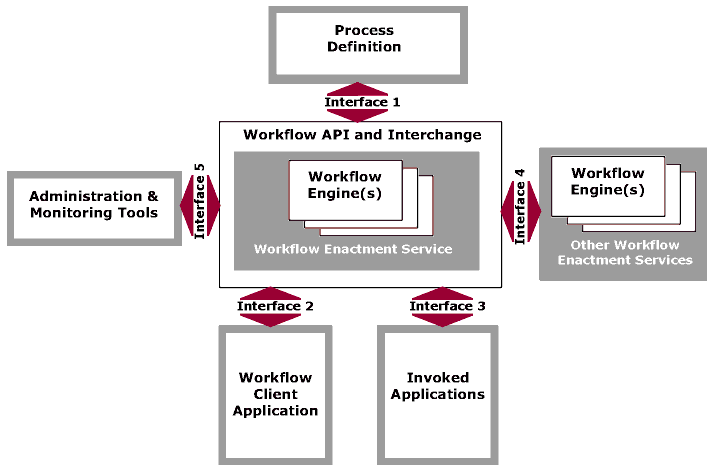
The following diagram shows workflow management according to the model standardized by the WfMC.
Terminology
The workflow vocabulary includes the following terms:
- process: sequence of steps that perform an action
- activity: workflow step
- process instance: active process created when the first step is executed
- activity instance: activity created and executed automatically or by an operator
These terms are represented in CMDBuild as follows:
- each process corresponds to a special class defined in the Administration Module under Processes; the class includes all attributes of the scheduled activities
- each process instance corresponds to a card of the process class (at the current activity), combined with the list of its versions (completed activities)
- each activity instance corresponds to a card of the process class (current activity) or to a historicized version (completed activity)
Each process has a name, one or more participants, variables and a sequence of activities and transitions.
The process status can be:
- active, i.e. still in an intermediate activity
- complete, i.e. all activities have been completed
- aborted, i.e. terminated before completion
- suspended, i.e. temporarily paused and resumable
Each activity is characterized by:
- a name
- a performer, corresponding to a user group and optionally to a specific operator
- a type: process start, process end, operator activity, system automatic activity
- a list of attributes coming from CMDBuild or defined within the workflow, which will be set during execution
- a list of widgets (visual controls of predefined types) configured during activity creation
- a script (Beanshell, Groovy or JavaScript) used in automatic activities to perform operations between one user activity and the next