User interface
Technology
The web desktop user interface of CMDBuild — in both the Administration Module and the Data Management Module — is implemented using the Sencha ExtJS framework, a JavaScript library for creating interactive web applications with AJAX technology.
Each operation performed by the user on the web interface is transmitted to the server — implemented in Java — through standard CMDBuild REST webservice calls. The server processes each request and translates it into operations on the PostgreSQL database.
General design criteria
The user interface of the Management Module includes the following main elements:
- header
- left‑side panel
- central work area
- popup window for dedicated information management
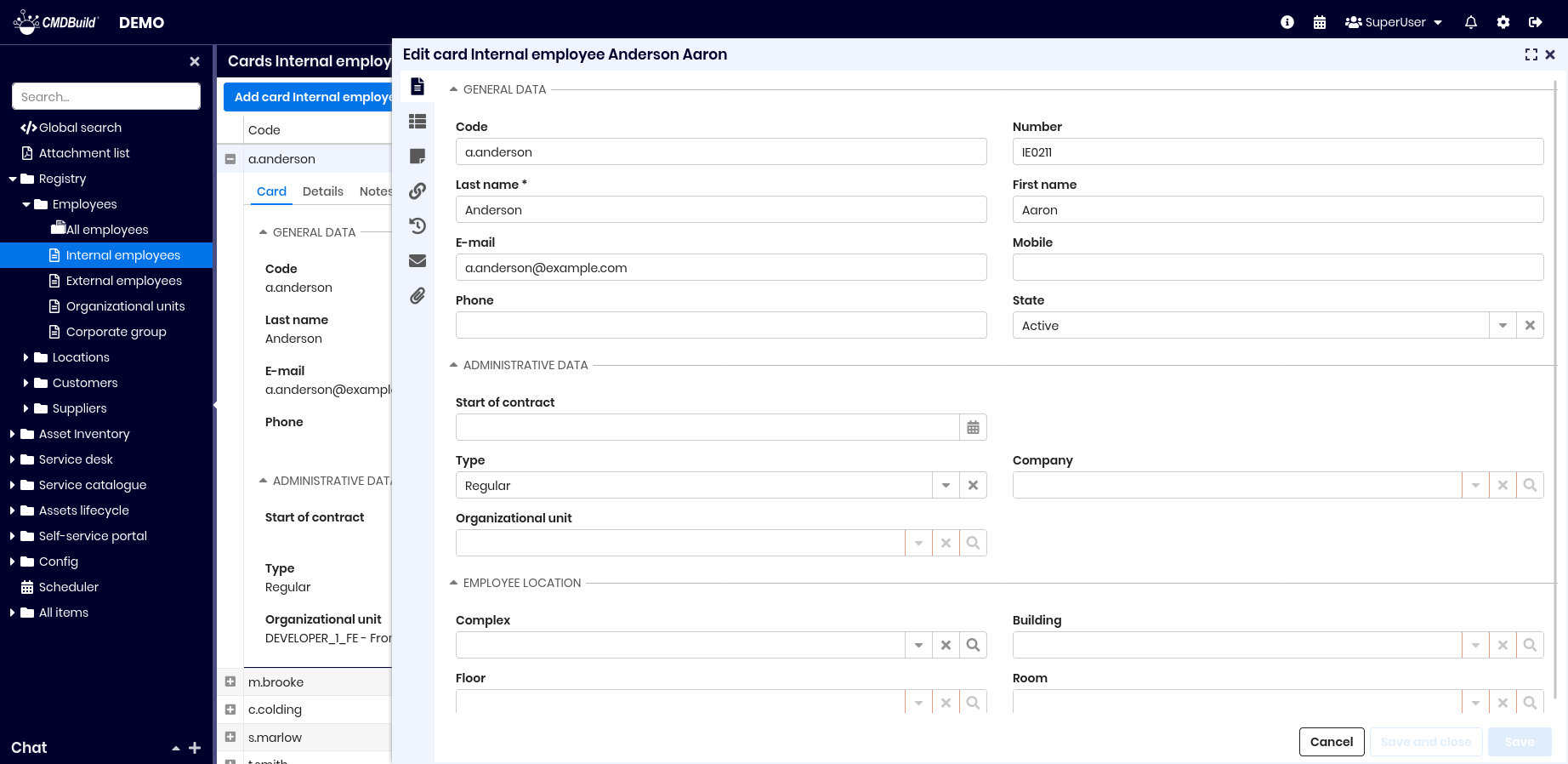
Header
The header includes:
- on the left, the application logo (to be preserved according to the CMDBuild distribution license), the user’s logo and the instance name
- on the right, an information panel containing:
- links to the official website, useful resources and credits
- access to the Scheduler
- the group name
- the preferences menu
- the notification list
- the switch to the Administration Module
- the logout function
Left‑side panel
The left‑side panel includes:
- the menu configured according to the operator’s role, which may include folders, classes, processes, views, dashboards, reports and custom pages
- access to the chat
Central work area
The central work area includes:
- at the top:
- action buttons for managing the selected item type, such as adding elements or starting processes
- additional controls for operations on the item type, such as quick search, filter selection, contextual menu, map view and others
- below:
- information organized in cards or grids (tables), allowing operators to:
- act on the header to manage columns
- act on rows to highlight, expand details or select
- act on details through a popup window, where available icons allow:
- consulting the full card information (data, details, notes, relations, history, attachments)
- editing the card (also via double click)
- deleting the card (logical deletion)
- cloning the card (with or without relations)
- opening the relation graph
- printing the card
- information organized in cards or grids (tables), allowing operators to:
Popup window
The popup window displays a card for viewing, inserting or editing information across its main components:
- data
- details
- notes
- relations
- history
- emails
- attachments
These components describe the standard structure of the interface. Specific installations may differ based on configuration.
Localization
CMDBuild provides two levels of localization — translation into the operator’s preferred language:
- first‑level localization, covering only the base CMDBuild interface (menu texts, standard buttons, headers, footers and similar elements)
- second‑level localization, covering all configured elements of each vertical application (class names, attributes, domains, lookups and others)
First‑level localization is managed through external JSON files, while second‑level localization is managed through the Administration Module.
When a localization is available (included in the base release or prepared by the Administrator) and enabled, each operator can access the translated application by selecting a language at login.
Operators can also set a default language in their preferences. Once selected, it will be prefilled on the login form, or they may choose not to display it.