CMDBuild configuration in cluster mode
CMDBuild allows you to configure a Cluster architecture, where a webserver load balancer distributes incoming requests to multiple CMDBuild instances (nodes).
All nodes connect to the same PostgreSQL database, configured in Master–Slave replication mode.
Service clustering provides two main benefits:
- High availability: if a CMDBuild instance stops working, the others continue providing the service
- Scalability: multiple instances (nodes) share the workload, improving response times
The following diagram illustrates the CMDBuild architecture in Cluster mode:
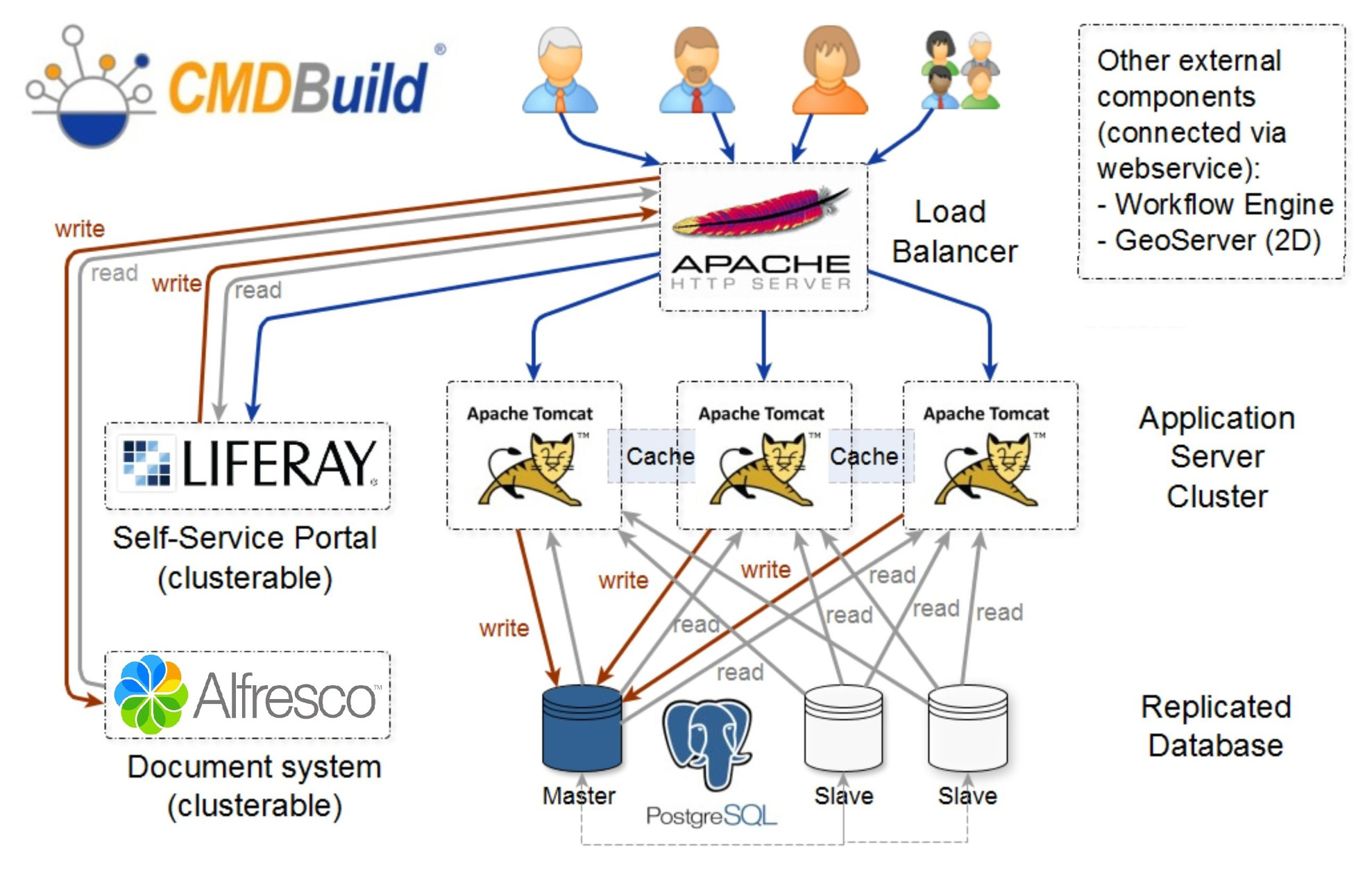
In the example above, the load balancer is implemented using the Apache webserver.
Both the load balancer and the PostgreSQL database can be made redundant using different techniques, which are not covered in this chapter.
Cluster configuration
In this chapter we simulate the creation of a CMDBuild architecture in Cluster mode, composed of four servers:
- One server running PostgreSQL as the master database
- One server running an instance of CMDBuild (Node 1) at address
10.0.0.100:8080 - One server running an instance of CMDBuild (Node 2) at address
10.0.0.101:8080 - One server running Apache as the load balancer
Below, the path of the webapp cmdbuild within the servers will be
identified with ${cmdbuild_home}.
The folder including the configuration files
${cmdbuild_home}/WEB-INF/conf has to be synchronized between the
various Tomcat Instances: in case the Tomcat instances are located in
different servers, you are suggested to load the folder conf onto
the various instances through NFS, so that you do not have to manage the
alignment of several configuration files.
Assuming that CMDBuild has been installed on the two servers by following the installation guide we can now proceed with the following steps:
Step 1
Update the configuration on both servers to enable Cluster mode.
Set the following variable to true:
org.cmdbuild.cluster.enabled = true
This operation can be performed using a REST command, by editing the variable with the setconfig command, or by viewing the full configuration with the editconfig command.
Step 2
Configure the service that manages communication between the various instances (JGroups).
The communication configuration described in this manual is based on a stack of standard protocols, using TCP as the transport protocol.
The configuration below enables node discovery for instances reachable through an IP address or domain name and is suitable for most installation scenarios.
If multiple nodes must run on the same host, the TCP port must be changed on one of the nodes using:
org.cmdbuild.cluster.node.tcp.port
Then configure the list of nodes:
org.cmdbuild.cluster.nodes = 10.0.0.101,10.0.0.102
Configuring the load balancer on Apache
Before configuring the load balancer, ensure that the following Apache modules are enabled:
- proxy
- proxy_http
- proxy_balancer
- lbmethod_byrequests
- headers
After verifying that all required modules are active, update the configuration file of the load balancer module.
It is also necessary to configure the desired VirtualHost and enable it in sites‑enabled to define the domain used to access the cluster.
Check if the Cluster is working
To verify that clustering is functioning correctly, check the contents of the table:
quarz_scheduler_state
This table must exist in the schema quarz of the CMDBuild database.
If everything is working properly, each configured Tomcat node (in this example, Node 1 and Node 2) will have a corresponding record in the table, and the value of the column last_checkin_time will update every few seconds.
Applying patches in Cluster mode
If CMDBuild is configured in Cluster mode and the web application needs to be updated, follow this procedure:
- Shut down all CMDBuild instances and update each CMDBuild webapp
- Start a single instance
- Access the running instance via browser and apply any SQL patches
- Start the remaining instances of the cluster