Getting Started
What is a CMDB
A CMDB (Configuration Management Database) is a storage and consultation system that manages a company’s asset information.
The concept of CMDB was born in the IT environment — it is a fundamental component of ITIL best practices (Information Technology Infrastructure Library). In this manual it is extended and applied in a general context where you need to know, manage and control assets (Configuration Items or CIs).
It is the official central repository and provides a consistent view of the items that must be managed.
It is a dynamic system that represents the current situation and knowledge of the asset inventory and related connections.
What is CMDBuild
CMDBuild is a robust, customizable and extensible CMDB solution. Providing an extensible solution means offering an open and dynamic system that can be designed, configured and extended by the system administrator in multiple phases: objects, types of attributes and relations(domains), workflows, reports and dashboards, interoperability with external systems and more.
Since no two organizations manage assets in the same way, system flexibility has been defined as the primary feature of CMDBuild. Many functions allow configuring the entire system and optimally designing the application according to specific needs (see the CMDBuild Overview Manual main mechanisms, native features, user interface).
From a technical point of view, configurability is based on extensive use of metadata.
The CMDBuild core interprets metadata and automatically generates the web interface for operators, who can update the CMDB, start and advance processes, run reports, view dashboards and more.
Despite its name, CMDBuild is not only a modeling environment for CMDB applications. Its mechanisms allow you to manage Configuration Items throughout their entire lifecycle through workflows, business rules, documents, reports, georeferences, interoperability tools and so on.
A system based on configurability offers several advantages:
- ability to adapt to your organization and work procedures
- possibility of gradual system deployment, reducing organizational impact
- easy response to organizational or technological changes
- increased user autonomy
- single “core” code used across different vertical solutions
Design criteria
At first, it is important to:
- choose a detail level proportional to organizational needs and available human, financial and technological resources
- identify and involve the staff who will set up (Administrator) and update (Operator) the information — an outdated system generates cost and no value
- introduce the new application into an organizational system with procedures, roles and responsibilities that help the IT structure manage information correctly
A successful Asset Management project must consider impacts and changes introduced by the system and must obtain explicit approval from the organization’s management.
Where to start
Implementing an Asset Management application with CMDBuild requires preliminary design work to define the initial schema, identifying main interests and options. The system can later be extended as needed.
Data model
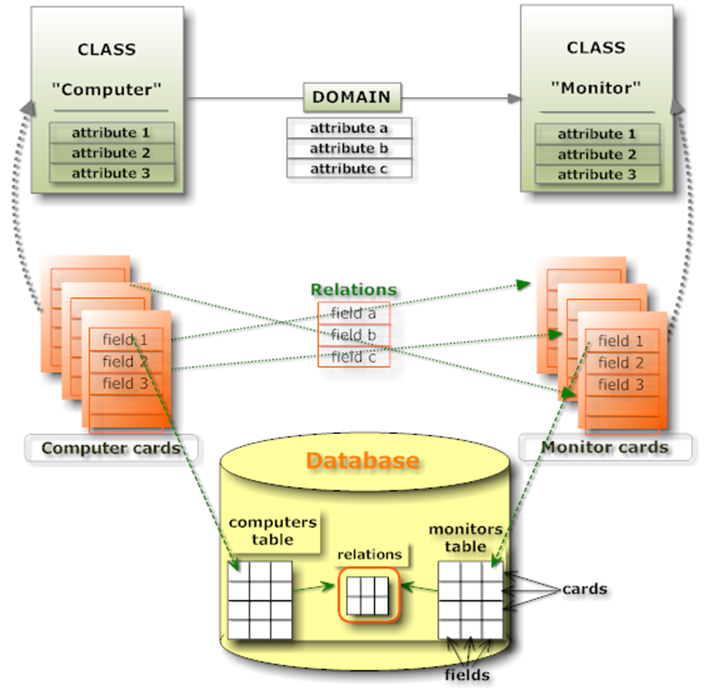
Regarding the data model, we recommend starting with a complete and accurate set of objects and relationships, and then extending the system once you have gained familiarity with CMDBuild.
In particular, you should identify:
- Types of items to manage classes: IT assets (computers, peripherals, network systems, phone devices, software), assets related to real estates (buildings, plants, technical devices, furniture), assets related to production plants (factories, machines), and other types (vehicles, medical instruments)
- Attributes used to define each class (e.g. code, description, supplier, purchase date) and their data types (string, long text, integer, decimal, float, date, lookup, reference, geographical attributes and open or closed polygons)
- Relations between classes
- Attributes used for each domains (e.g. role of a person responsible for a service, type of dependency between assets) and related data types
- User accounts for every class
Another important aspect is the class hierarchy. In CMDBuild you can define abstract classes (superclass) used as templates (e.g. Computer) and derive subclasses (e.g. Desktop, Laptop, Server), which will include shared attributes defined in the superclass and their own specific attributes, as well as inherited and specific domains.
It is important to design a hierarchy that meets current and future needs, since a class cannot be automatically converted into a superclass.
Once the entity–relationship model is defined, you must create classes and their attributes.
At the end of this phase you should:
- use the Administration Module to model the system using the E‑R editor
- use the Management Module to insert, update and view cards
Processes
One major added value of CMDBuild is the possibility of defining processes (workflows) to guide operators during management activities.
As with the data model, CMDBuild does not provide predefined static processes but offers a generic configuration system adaptable to each organization’s needs.
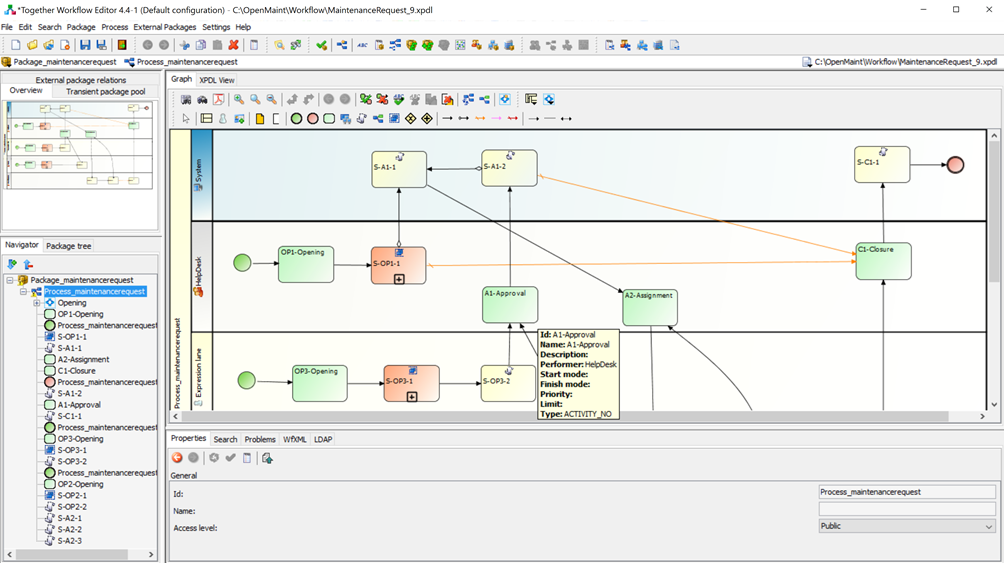
Workflows are designed using the external open source visual editor TWE — Together Workflow Editor, then imported into CMDBuild as standard XPDL files to be executed by the workflow engine.
In the IT environment, these mechanisms allow configuration of all ITIL best practice processes: Incident Management, Change Management, Request Fulfillment, Service Catalog and others. In Facility Management, all scheduled and breakdown maintenance processes can be configured.
During analysis, you should identify:
- Actors involved (user groups or roles)
- Workflow structure
- User activities (interactive)
- Automatic activities (scripts executed by the system)
- Transitions between activities (mandatory or conditional)
- For each user activity (data entry form):
- List of information with data types and presentation modes (read-only, read/write, mandatory)
- Widgets for additional operations (card view, relation creation, email sending, attachment upload)
- For each automatic activity: operations to implement (card or relation updates, report generation, email sending, external webservice calls)
During creation, you will:
- Configure, through the Administration Module, persistence elements of the CMDB (new process class, attributes identified during analysis, domains between the process and other classes or processes)
- Create user groups involved in the process
- Export the new process structure for use in TWE (roles and attributes)
- Design the process in TWE:
- Lanes with user roles
- User activities with attributes and widgets
- Automatic activities and related scripts
- Save the XPDL file and import it into CMDBuild
Once imported, the new process can be used through the Management Module, which interprets and executes its flow. Any modifications require updating the process and applying changes to new process instances.
For additional details, see the CMDBuild Workflow Manual.
Reports and dashboards
As with other functionalities, design starts from user needs and a detailed analysis.
For each report you must define:
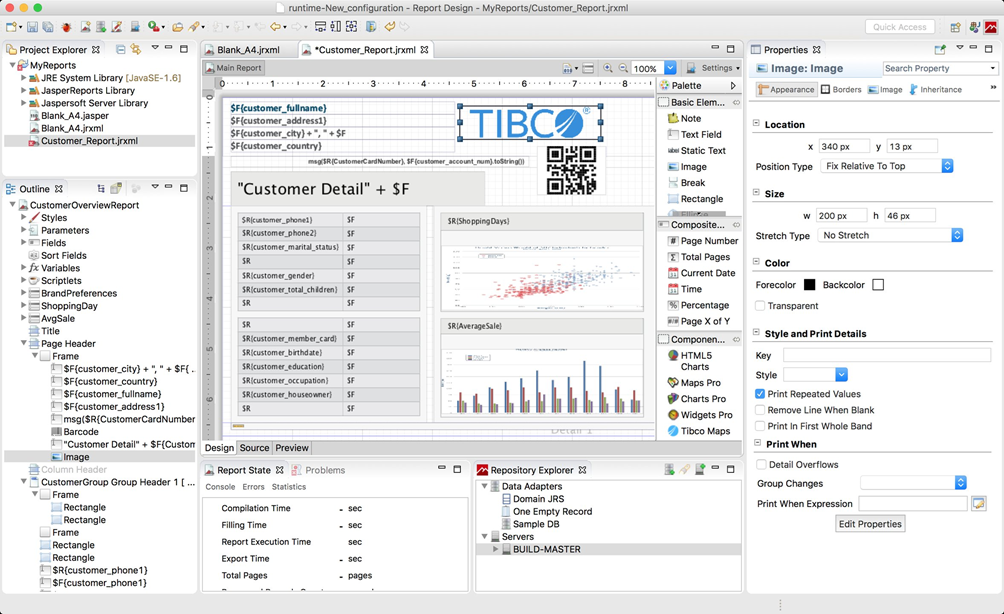
- General page layout (orientation, header, footer, date, page number, images, shapes)
- Types of information to extract from the database (SQL query, columns, joins, filters)
- Organization of extracted data (card, table, subreports, formatting, calculations)
- Specific needs (charts, barcodes, pivot tables)
- Execution parameters with default values
Custom reports are designed using JasperStudio from the open source JasperReports suite. Reports are saved as XML files, imported into CMDBuild via the Administration Module and made available to operators.
Regarding dashboards, for each chart you must identify:
- Number and placement of charts in the dashboard
- For each chart:
- Data to represent and how to extract it
- Chart type (pie, bar, line, gauge)
Dashboard configurations are created from the Administration Module, after preparing a PostgreSQL function that extracts the necessary data.
User interface and custom business logics
The Data Management Module interprets metadata defined in the Administration Module to automatically generate the user interface used to consult and update data, execute processes, print reports and view dashboards.
Sometimes operators need custom pages: multiple data views, multiple tables on the same page, calculated fields, custom graphs and more.
In this case, CMDBuild provides Custom Pages, which allow designing fully customized interfaces.
Since CMDBuild 3.0, custom pages can be implemented in JavaScript using the ExtJS framework, reusing existing GUI components for full integration.
It is also possible to implement:
- Features triggered from contextual menus
- Custom widgets
- Form triggers
- Dynamic behaviors: hide or lock attributes based on other fields, enhance attributes based on dependencies, define custom validators
Interoperability solutions
CMDBuild implements a Service Bus that manages internal communication and enables interoperability with external applications and systems, through standard services for coordination, security, messaging, routing and transformations. Tasks can be configured through descriptor files. The Service Bus uses a plugin architecture that supports standard components, advanced components available by subscription and custom extensions.
Other activities
All other configurations can be performed using the Administration Module.