Attributes
This page describes how to configure the attributes of a class in CMDBuild. Attributes define the structure of the data stored in each card and correspond to the physical columns of the underlying database table.
Each attribute includes general properties, type‑specific settings and advanced behaviours that determine how the attribute is displayed, validated and managed in the Management Module.
The following sections detail all available configuration options for attribute definition and customization.
General Properties
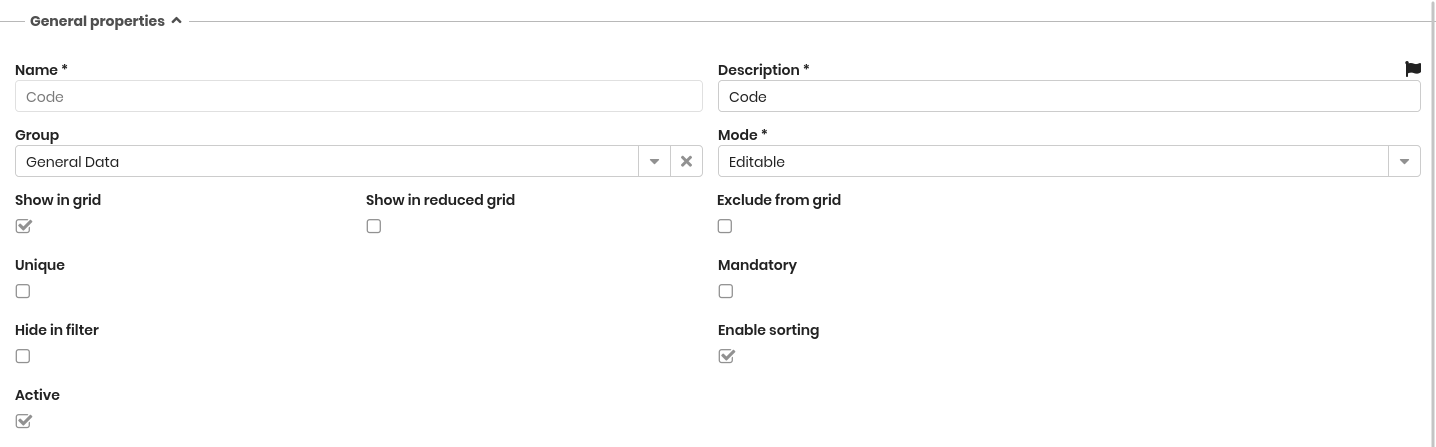
The following information is required:
- Name: physical name of the database column
- Description: the attribute name displayed in the application.This field is localizable by selecting the flag icon, which opens a popup window for translation into the enabled languages
- Group: defines the grouping of attributes in the Management Module
- Mode:
- Editable: standard editable field
- Read Only: visible but not editable
- Hidden: not visible in the form
- Immutable: can be set only once and cannot be modified afterward
- Show in grid: shows the attribute in the main grid of the Management Module
- Show in reduced grid: shows the attribute in reduced grids (GIS, BIM or mobile App)
- Exclude from grid: removes the attribute from the list of columns that users can enable in the grid
- Unique: indicates that the attribute represents a unique key
- Mandatory: indicates that the attribute must be present
- Hide in filter: hides the attribute from the list of fields usable in filters
- Enable sorting: allows the grid to be sorted using this attribute
- Active: enables or disables the attribute
Property of the Attribute Type
This section defines the specific configuration parameters associated with each attribute type. Some properties are common to all attribute types, while others depend on the selected type.
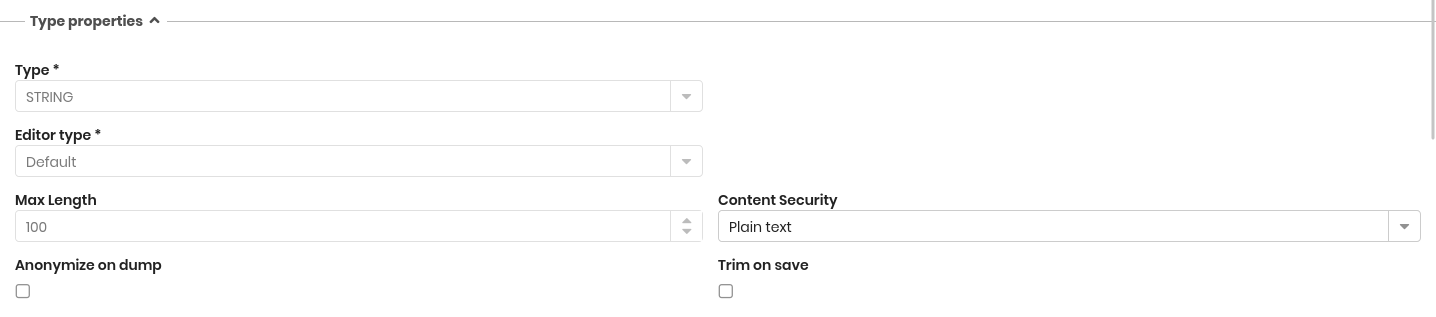
The following information is always available:
- Type of attribute, which can be:
Below are the additional properties required for each attribute type.
Biginteger attributes
- Unit of measure (free text)
- Positioning of the UM: before or after the number
- Show thousands separator
Boolean attributes
- Default value
Char attributes
No additional configuration options.
Date attributes
No additional configuration options.
Decimal attributes
- Precision: total number of digits
- Scale: number of digits in the decimal part
- Unit of measure (free text)
- Positioning of the UM: before or after the number
- Show thousands separator
Double attributes
- Unit of measure (free text)
- Positioning of the UM: before or after the number
- Show thousands separator
- Visible decimals (rounded if exceeded)
File attributes
File attributes allow managing an attachment stored in the DMS as a card field.
- DMS Category: selected among those configured for the class
- Show Preview: enables preview directly on the card
Foreign key attributes
Foreign key attributes allow referencing a card or a process instance in another class or process.
- Destination: the class or process to which the attribute refers
- On destination card delete:
- Do not delete if the reference exists
- Delete also related cards
- Delete relation
Formula attributes
Formula attributes are virtual attributes not stored in the database; their value is computed dynamically through SQL or Groovy.
- Formula: SQL function or Groovy script
- Function (for SQL formulas)
- Script component (see Script)
Integer attributes
- Unit of measure (free text)
- Positioning of the UM: before or after the number
- Show thousands separator
IP address attributes
- IP type: IPv4, IPv6 or mixed
Link attributes
Link attributes store a URL.
- Show label: displays a label field associated with the URL
- Label required: makes the label mandatory
Lookup attributes
Lookup attributes allow selecting a value from a predefined list.
- Lookup: associates a lookup list with the attribute
- Filter: CQL condition for filtering values
- Metadata: auxiliary variables usable in the filter
- Pre-select if unique: assigns the value automatically when only one option is available
LookupArray attributes
LookupArray attributes are similar to Lookup attributes but allow selecting multiple values.
- Lookup: associates a lookup list with the attribute
- Filter: CQL condition for filtering values
- Metadata: auxiliary variables usable in the filter
Reference attributes
Reference attributes link the current card to another card through a 1:N domain.
- Domain: domain defining the relation between classes
- Filter: CQL condition for filtering selectable cards
- Metadata: auxiliary variables usable in the filter
- Use domain filter: applies the filter defined in the domain configuration
- Pre-select if unique: assigns the value automatically when only one option is available
String attributes
- Editor type: Default or Password
- Max length: maximum number of characters (visible only with the Default editor)
- Content Security (only with Default editor):
- Plain text
- Secure HTML
- Complete HTML
- Show password to (only with Password editor):
- All users
- No one
- Users with write permission
- Anonymize on dump: anonymizes the column when generating a CLI dump
- Trim on save: removes leading and trailing spaces when saving
Text attributes
- Editor type:
- Plain text
- HTML editor
- Markdown editor
- Content safety:
- HTML safe
- HTML all
- Anonymize on dump: anonymizes the column when generating a CLI dump
Time attributes
- Show seconds
Timestamp attributes
- Show seconds
Other Properties
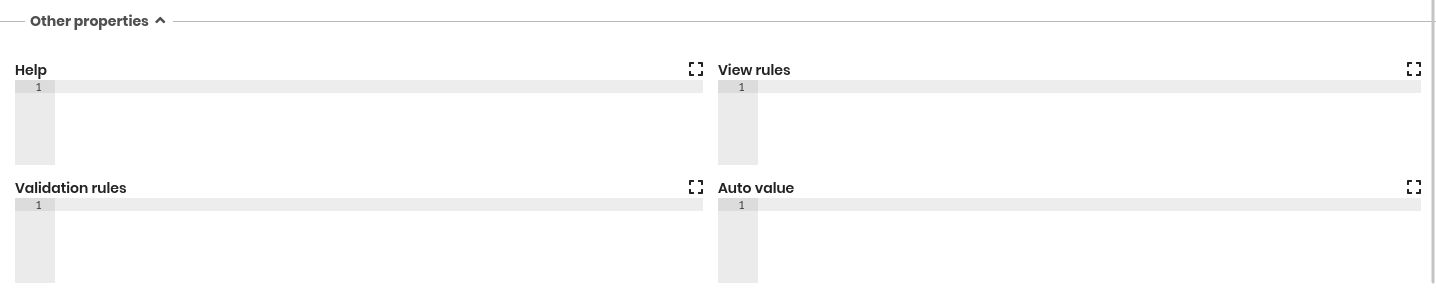
This section contains advanced configuration options that can be defined through the expander button. These options allow customising how the attribute behaves in the Management Module and how values are validated or computed.
The available options include:
- Help: allows defining a help text for the operator, written using Markdown syntax. The help text is displayed in the Management Module to assist users during data entry
- View rules: allows hiding or disabling the attribute dynamically based on conditions evaluated at runtime. The behaviour is defined using JavaScript and can depend on the values of other fields in the form
- Validation rules: allows defining JavaScript rules that verify whether the entered value is valid. If the rule is not satisfied, the card cannot be saved until the validation passes
- Auto value: allows defining JavaScript expressions that automatically set the value of the attribute based on other fields or custom logic. This rule is executed when the form is opened or when relevant fields are modified